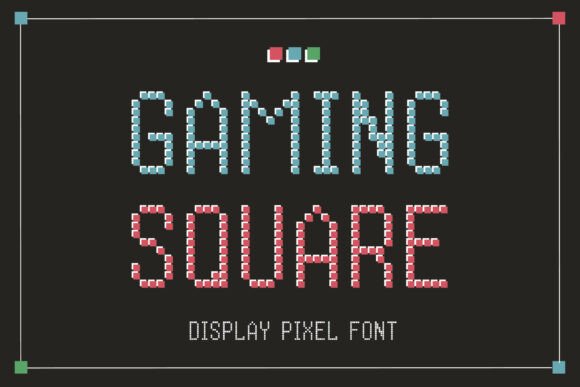
Gaming Square: A Practical Guide to Integrating Retro Typography into Modern Workflows
In the landscape of digital design, typography is rarely just about legibility; it is a strategic tool for setting tone, establishing brand identity, and guiding user interaction. Gaming Square represents a specific niche within this field, offering a pixel font inspired by the retro arcade games of the late 20th century. For professionals ranging from game developers and UI/UX designers to marketing strategists and content creators, understanding how to integrate Gaming Square into a project requires more than simply downloading a file. It demands a structured approach to planning, implementation, and quality control to ensure the aesthetic serves the functional goals of the work.
Defining the Role of Gaming Square in Design Strategy
Gaming Square is characterized by its bold, grid-based design, mimicking the low-resolution displays of vintage consoles and arcade cabinets. While the visual style is playful and whimsical, its application in professional workflows must be deliberate. This font is not merely a decorative element; it is a semantic signal that evokes nostalgia, simplicity, and a distinct "digital" heritage.
When approaching a new project, the decision to use Gaming Square should occur during the conceptual phase, alongside decisions regarding color palettes, imagery, and overall user experience. It fits best in contexts where the goal is to communicate a sense of fun, accessibility, or a connection to gaming culture. Whether you are designing a mobile app interface, creating assets for a video game, or developing branding for a tech startup with a retro angle, the font acts as an anchor for the visual language.
The clarity of its characters ensures that despite the blocky aesthetic, readability remains high. This makes it suitable for headers, call-to-action buttons, and short-form copy where impact is prioritized over dense information delivery. However, integrating it effectively requires an understanding of its limitations and strengths within the broader design ecosystem.
Pre-Project Planning and Asset Preparation
Before implementing Gaming Square, successful execution begins with preparation. The first step involves auditing the project requirements against the font's capabilities. Because Gaming Square relies on a strict grid system, it behaves differently than standard serif or sans-serif typefaces. Designers must account for these structural differences when laying out grids and defining spacing.
Consider the following factors during the planning stage:
- Resolution Compatibility: Pixel fonts render best at specific sizes. Scaling them too large without anti-aliasing can result in jagged edges that look unintentional rather than stylistic. Conversely, scaling them too small may cause character loss. Establish a size range early in the process.
- Content Volume: Determine if the text volume aligns with the font's legibility profile. Gaming Square is ideal for headlines and labels but less effective for long paragraphs of body text. Plan your content hierarchy accordingly.
- Brand Alignment: Ensure the retro aesthetic supports the brand message. If the target audience values modern minimalism, the bold, chunky nature of Gaming Square might clash unless used sparingly as an accent.
Organizing your asset library is also crucial. When working with Gaming Square, keep the original font files and any custom variations in a dedicated folder structure. This prevents version conflicts later in the workflow, especially when collaborating with other team members or developers who need access to the exact same glyphs.
Integration During the Creative Process
Once the planning phase is complete, the integration of Gaming Square moves into the execution stage. This is where the font interacts with other tools, resources, and design elements. In software like Adobe Illustrator, Photoshop, or Figma, the font should be applied with precision to maintain its grid integrity.
A common workflow involves using Gaming Square for primary navigation elements or key interactive components. For example, in a game interface, the font can label inventory items or scoreboards. In a web design context, it might serve as the main headline for a landing page promoting a retro-themed product. The key is consistency. Once the font is chosen for a specific element type, apply it uniformly across all screens or pages to build visual rhythm.
Interoperability with other design assets is another critical factor. Gaming Square pairs well with flat colors, geometric shapes, and pixel-art illustrations. When combining it with smoother, vector-based graphics, consider adding subtle drop shadows or outlines to bridge the gap between the pixelated text and the clean lines of the surrounding art. This technique helps the font feel intentional rather than out of place.
Furthermore, consider the technical constraints of the platform. If the project involves web development, ensure the font is optimized for web loading times. Converting the font to WOFF2 format can improve performance without sacrificing the crispness of the pixels. For mobile applications, test the font on various screen densities to guarantee that the grid alignment remains sharp on high-resolution Retina displays.
Workflow Example: Developing a Game Menu
To illustrate the practical application, consider a scenario where a freelance developer is building a menu system for an indie game. The workflow would proceed as follows:
- Conceptualization: Define the menu's purpose (e.g., start game, options, credits) and select Gaming Square to match the game's 8-bit art style.
- Prototyping: Sketch the layout, ensuring ample padding around the text. Pixel fonts often require more whitespace to prevent characters from visually merging.
- Asset Creation: Apply the font in the design software. Adjust tracking (letter-spacing) slightly if necessary to accommodate the wide stance of the characters.
- Testing: Export the design and view it on the target device. Check for aliasing issues or rendering inconsistencies.
- Refinement: Make final adjustments to contrast and sizing before handing off to the coding team.
Post-Implementation Quality Control and Maintenance
After Gaming Square has been deployed, the work is not finished. Quality control measures are essential to ensure the font continues to perform as intended across different environments. This includes checking for cross-browser compatibility in web projects and verifying display accuracy on various operating systems.
Long-term maintenance involves monitoring how the font ages with updates to the project. As new features are added or the design evolves, the typographic choices must remain consistent. If the project expands to include new languages or special characters, verify that Gaming Square supports the required glyphs. If it does not, have a backup plan ready, such as pairing it with a complementary font that matches the weight and style but offers broader character coverage.
Efficiency in the long run also depends on documentation. Create a style guide that specifies exactly when and how to use Gaming Square. Include rules for sizing, color combinations, and acceptable pairings with other typefaces. This documentation ensures that anyone joining the project later can maintain the visual standards without needing to guess the design intent.
Strategic Outcomes and Professional Application
The ultimate value of using Gaming Square lies in its ability to evoke a specific emotional response while maintaining functional clarity. For entrepreneurs and marketers, this translates to a stronger brand recall. The unique visual signature of the font can make a digital product stand out in a crowded marketplace filled with generic sans-serif interfaces.
Educators and content creators can leverage the font to engage audiences who appreciate the history of technology or gaming. By incorporating Gaming Square into presentations, course materials, or blog headers, they create a thematic consistency that reinforces the subject matter.
However, the most successful implementations balance aesthetics with usability. The font should never hinder the user's ability to read or navigate. Regular user testing can reveal if the retro style is achieving the desired effect or if it is causing confusion. Feedback loops allow teams to refine the usage of Gaming Square, ensuring it enhances the user experience rather than detracting from it.
Conclusion
Integrating Gaming Square into a professional workflow is a process that spans from initial concept to long-term maintenance. It requires careful planning regarding resolution and content volume, precise execution during the design phase, and rigorous quality control post-deployment. By treating this pixel font as a strategic asset rather than a mere decoration, creators can harness its nostalgic power to deliver engaging, consistent, and high-quality digital experiences. Whether for a small business owner launching a retro-themed store or a developer crafting a new game, the disciplined application of Gaming Square ensures that the spirit of vintage gaming translates effectively into modern digital realities.