Wakupo: The Handwritten Display Font That Actually Works
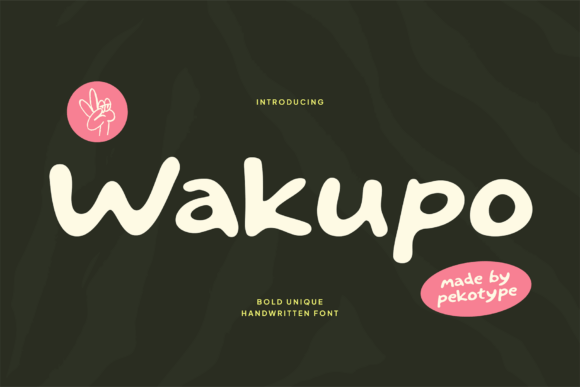
In the crowded landscape of digital design, finding a typeface that feels both authentic and legible is often a balancing act. Wakupo enters this space as a unique handwritten display font designed to inject warmth, personality, and playful energy into your visual projects. Inspired by natural strokes and organic handwriting, it offers a bold yet friendly character that stands out without screaming for attention. However, like any expressive typeface, using Wakupo effectively requires more than just downloading a file; it demands an understanding of where it shines and where it might fall flat if misapplied.
Understanding the Character of Wakupo
At its core, Wakupo is not merely a collection of letters; it is a stylistic choice that communicates approachability. The font features a full set of uppercase and lowercase letters, providing the expressive versatility needed for branding, logos, product packaging, and social media graphics. Its handcrafted style blends modern display aesthetics with the simplicity of casual handwriting, making it particularly effective for café menus, promotional designs, and creative campaigns that need to feel human.
Many designers are drawn to Wakupo because it solves a common problem: sterile, over-polished typography that fails to connect emotionally with an audience. By mimicking the imperfections of real pen-on-paper strokes, Wakupo creates an immediate sense of trust and authenticity. Furthermore, its support for multilingual characters makes it a flexible asset for global projects, allowing you to maintain a consistent brand voice across different languages without losing the font's distinctive charm.
The Trap of Overusing Handwritten Fonts
One of the most common mistakes creators make when encountering a font like Wakupo is assuming that "handwritten" equals "versatile for everything." This is a dangerous misconception. While Wakupo brings a delightful energy to headlines and short phrases, it is not designed for long-form body text. Using a display font for paragraphs can lead to poor readability, causing your audience to disengage before they even understand your message.
When you apply Wakupo to large blocks of text, the irregular spacing and varying stroke widths that give it personality become obstacles to comprehension. This affects usability and efficiency, forcing the reader to work harder to decode the information. In a marketing context, this friction can directly impact conversion rates and overall satisfaction. A logo or a banner headline should grab attention, but the supporting text needs to deliver clarity. The mistake here isn't in choosing Wakupo; it's in failing to pair it with a neutral, highly legible sans-serif or serif font for the body copy.
Better Approaches to Pairing
To avoid this pitfall, treat Wakupo as the star of the show rather than the entire cast. Use it for titles, call-to-action buttons, and key branding elements where its organic nature adds value. For the rest of your layout, select a clean, geometric, or humanist sans-serif that complements the curves of Wakupo without competing with them. This combination ensures your message stands out with confidence while remaining easy to read. For example, a café menu might use Wakupo for the name of signature dishes but switch to a simple font for ingredient lists and prices. This balance preserves the charm while maintaining professional standards.
Misjudging Scale and Context
Another overlooked detail when working with expressive fonts is scale. Wakupo is designed with bold strokes and open forms that look fantastic at larger sizes. However, shrinking a handwritten display font too small can result in muddy details and lost character. The very features that make it eye-catching on a billboard or a website header can cause it to disappear on a business card or a mobile app icon.
Designers often underestimate how screen resolution and print quality affect these intricate details. If you reduce Wakupo below a certain point size, the natural variations in the letterforms may blur together, creating a visual mess that undermines the professional quality of your work. This error can negatively affect presentation and cost, leading to wasted printing runs or a redesign after launch.
The solution is to test your typography in the actual environment where it will be seen. Before finalizing a design, zoom out to 50% or 25% to simulate how the font appears from a distance or on a smaller device. If the letters lose their definition, increase the size or consider a simpler variation of the font family if available. Always prioritize legibility over stylistic flair when space is limited.
Evaluating Licensing and Project Scope
Before integrating Wakupo into a commercial project, it is crucial to verify the licensing terms. Many free or low-cost fonts come with restrictions on commercial use, web embedding, or the number of end products allowed. A common misunderstanding is assuming that buying a font grants unlimited rights for all future projects. If you plan to use Wakupo for product packaging, merchandise, or a major advertising campaign, ensure your license covers these specific applications.
Ignoring these details can lead to legal complications and unexpected costs down the line. It is better to invest time in reading the documentation or contacting the creator than to risk a cease-and-desist order later. Additionally, check if the version you have downloaded includes the full multilingual character set you require. Some versions might lack specific accented characters or symbols needed for international markets, which could force a last-minute font swap that disrupts your design consistency.
How to Make the Right Decision
Deciding whether Wakupo is the right fit for your next project involves a few practical checks. First, ask yourself what emotion you want to convey. If your brand is corporate, serious, or technical, Wakupo's playful energy might clash with your identity. Conversely, if you are targeting a younger demographic, launching a lifestyle brand, or creating content for social media, its organic feel is likely a strong asset.
Second, review your existing color palette and imagery. Handwritten fonts thrive on contrast and whitespace. They need room to breathe. If your design is already cluttered with heavy textures or complex patterns, adding a busy font like Wakupo might create visual noise. Simplify the background to let the typography shine.
Finally, test the font in mockups. Create a few sample designs—a logo concept, a social media post, and a packaging label—to see how Wakupo performs across different mediums. Pay attention to how the uppercase and lowercase letters interact and whether the kerning feels natural in your specific application.
Key Takeaways for Success
- Respect Readability: Limit Wakupo to headlines and short phrases; pair it with a clean font for body text.
- Check Scale: Ensure the font remains legible at the intended size, especially on mobile devices or small prints.
- Verify Licensing: Confirm that your usage rights cover all planned commercial applications and languages.
- Match the Mood: Only use Wakupo when the playful, warm tone aligns with your brand's core message.
- Test in Context: Always view the font in a realistic mockup before finalizing any design decisions.
By approaching Wakupo with a strategic mindset, you can harness its unique ability to bring warmth and personality to your designs without falling into common traps. When used correctly, this handcrafted font becomes more than just a decorative element; it becomes a powerful tool for communication that helps your message stand out with genuine charm and confidence.