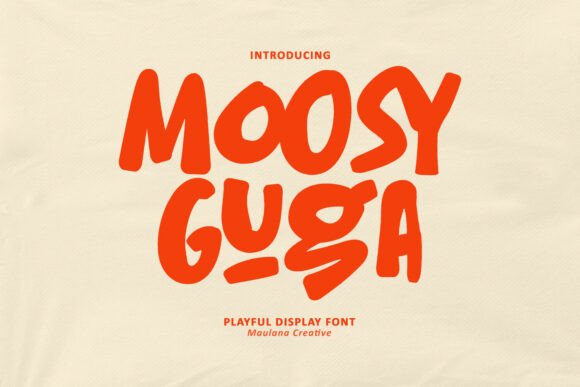
Moosy Guga: The Playful Display Font That Actually Works
In the crowded landscape of digital design, finding a typeface that balances whimsy with readability is often a challenge. Moosy Guga steps in as a vibrant solution for those who need to inject character and charm into their projects without sacrificing clarity. Inspired by hand-drawn, chunky lettering, this font is designed to stand out and bring a smile to your audience's faces. However, like any bold display typeface, it requires thoughtful application to ensure it enhances your message rather than overwhelming it.
Whether you are a marketer crafting a campaign for children's products, an educator designing classroom materials, or a small business owner branding a bakery, understanding how to wield Moosy Guga effectively is crucial. Many creators dive straight into using playful fonts without considering the broader context of their design, leading to cluttered visuals and poor user experiences. Let's explore how to use this bubbly typeface correctly, avoiding common pitfalls while maximizing its potential.
Understanding the Role of Moosy Guga
Moosy Guga is not a workhorse font meant for long-form body text. It is a display font, which means it is engineered specifically for headlines, logos, short phrases, and decorative elements. Its rounded edges, varying stroke widths, and organic feel mimic the spontaneity of marker-on-paper art. This aesthetic makes it perfect for conveying friendliness, creativity, and approachability.
People are drawn to this font because it breaks the monotony of standard sans-serif or serif typography. In a world dominated by clean, corporate minimalism, Moosy Guga offers a human touch. It signals to the viewer that the content behind it is fun, accessible, and perhaps a little unconventional. For brands targeting families, hobbyists, or creative communities, this emotional connection can be the difference between a scroll-past and a click-through.
Common Mistakes When Using Chunky Display Fonts
Despite its appeal, Moosy Guga is frequently misused. The most common error is treating it as a universal solution for all text needs. Beginners often apply it to paragraphs, captions, or instructional copy, resulting in text that is difficult to read and visually exhausting. Because the letters are thick and irregular, the eye struggles to track lines of text longer than a few words.
Another frequent oversight is ignoring whitespace. The bubbly nature of the font naturally occupies more visual space than standard typefaces. When designers pack these letters too tightly together or fail to provide adequate padding around the text block, the design feels cramped and chaotic. This lack of breathing room undermines the very "fun" vibe the font is supposed to create, making the project look amateurish rather than playful.
Furthermore, many users overlook color contrast. While Moosy Guga looks great in bright, saturated colors, placing a light-colored version of the font on a similarly light background creates legibility issues. Conversely, using it in black on white can sometimes appear too heavy and aggressive if not balanced with sufficient line height. These technical missteps can significantly impact the professionalism of your final output, causing audiences to lose trust in the brand or message.
How Poor Application Affects Your Results
The consequences of misusing a font like Moosy Guga extend beyond aesthetics. In marketing, readability directly correlates with conversion rates. If a customer cannot quickly scan your headline or understand your call to action, they will leave. A font that is too busy or illegible increases cognitive load, forcing the reader to work harder to decode the message. This friction often leads to frustration and disengagement.
For educators and content creators, clarity is paramount. Using a chunky display font for instructional material can confuse learners, especially younger students or those with dyslexia. The irregular shapes of the letters might interfere with letter recognition, turning a learning opportunity into a struggle. Similarly, in professional presentations, over-reliance on whimsical fonts can undermine authority, making the presenter appear less serious about the subject matter.
Strategic Approaches for Better Design
To avoid these pitfalls, adopt a strategy of restraint and pairing. Treat Moosy Guga as the star of the show, but give it supporting actors. Pair it with a clean, neutral sans-serif font for body text. This combination allows the personality of Moosy Guga to shine in headlines while ensuring the rest of the content remains easy to digest. For example, use Moosy Guga for the main title of a blog post about "Fun Summer Activities," but switch to a simple Arial or Open Sans for the list of activities below.
Pay close attention to sizing and spacing. Increase the line height (leading) when using this font to prevent the ascenders and descenders from colliding. If you are using it for a logo, consider adjusting the kerning manually. Some characters in hand-drawn styles may have uneven gaps that need tightening or loosening to achieve visual balance. Taking these extra minutes during the design process ensures a polished, professional finish.
Color selection should also be deliberate. If you want to maintain the friendly vibe, opt for high-contrast combinations. A deep navy blue paired with a soft yellow, or a rich purple against a cream background, can make the chunky letters pop without straining the eyes. Avoid gradients within the letters themselves unless you are an advanced designer; flat colors usually render better across different devices and screen sizes.
Evaluating Moosy Guga Before You Commit
Before downloading or purchasing Moosy Guga for a major project, take the time to evaluate its compatibility with your specific goals. Check the license agreement carefully. Some free versions of display fonts are restricted to personal use only, meaning you cannot legally use them for commercial branding or client work. Ignoring this detail can lead to costly legal disputes down the road.
Test the font in various environments. How does it look on a mobile screen compared to a desktop monitor? Does it remain legible when scaled down for social media thumbnails? Print a sample page to see how the ink interacts with the paper texture, as chunky strokes can sometimes bleed or blur in print if the resolution isn't high enough. These practical tests will reveal whether the font holds up under real-world conditions.
Finally, consider your audience's expectations. While Moosy Guga is excellent for a toy store or a birthday party invitation, it might feel out of place for a financial advisory firm or a medical clinic. Aligning your typography choices with your brand voice is essential for building trust. If the font feels forced or mismatched with your industry, it will distract from your core message.
Final Thoughts on Typography Choices
Moosy Guga is a fantastic tool for adding warmth and personality to your designs, but it demands respect and careful handling. By understanding its limitations and strengths, you can avoid the common traps that plague novice designers. Remember that good typography is invisible; it guides the reader effortlessly through your content. When used correctly, this playful font becomes a powerful asset that enhances communication, boosts engagement, and leaves a lasting positive impression.
Take the time to pair it wisely, test it thoroughly, and keep your audience's experience at the forefront of your decisions. With these practices in mind, you can harness the full potential of Moosy Guga to create work that is not only beautiful but also functional and effective.